
Online Order Guide
Placing an Online Order
This form can guide you through the steps of placing an online order. If you run into any issues that this guide does not cover, don’t hesitate to contact us directly at 417-836-5403 or email bookstore@missouristate.edu.
Here is a quick breakdown of the steps. More detailed information follows.
- Add Items to Your Cart
- Go to Checkout
- Create / Log into Your Account
- Add Shipping and Billing Info
- Choose Delivery Method
- Select Payment Method
- Review & Finalize
- Receive Order Confirmation
Additional Info:
- Substitutions may be made based on availability of New/Used condition books and your final order cost is subject to change.
- If you need to make changes after submitting an order, contact the Bookstore and provide your M-Number and Order Number.
- You are only charged when an order is filled and ready for pick-up, not at the time of confirmation.
- After semester classes begin, you will have 10 business days to collect any “Ready for Pickup” In-Store order items. After that period, unclaimed items will be returned.
- We highly recommend placing an order for course materials that are currently out of stock. Your order will be filled as soon as the item becomes available.
- StreamlinED materials cannot be ordered through the website. They are automatically charged to your student account based on course enrollment.
Step 1: Add Items to Your Cart
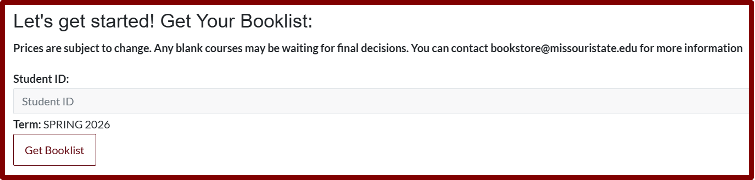
For textbooks, use this Booklist link and enter your M‑Number.
For supplies, BearWear, and merchandise, browse categories on the website.
Step 2: Go to Checkout
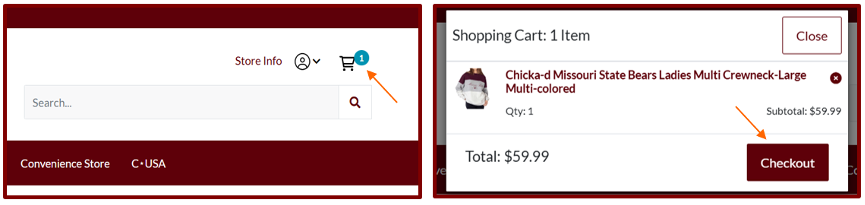
Click the cart icon in the upper-right corner of the page. Select Checkout in the window that will appear.
Step 3: Create Account or Login
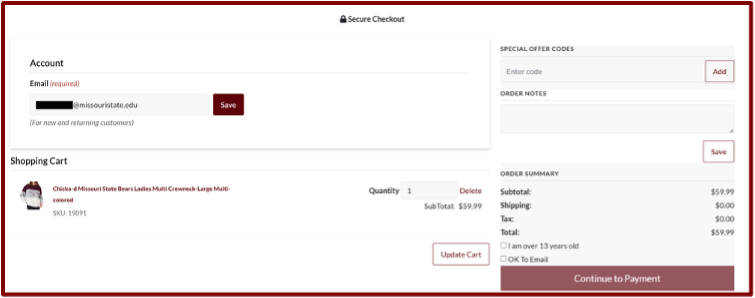
Enter email and click Save.
- Use your Missouri State email to charge items to your student account.
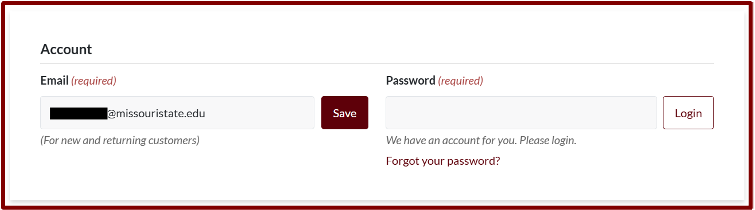
Create a password (new users) or log in (returning users).
- New users must enter shipping and billing addresses before the delivery options will appear below.
Step 4: Add Shipping and Billing
Fill out Shipping and Billing details completely.
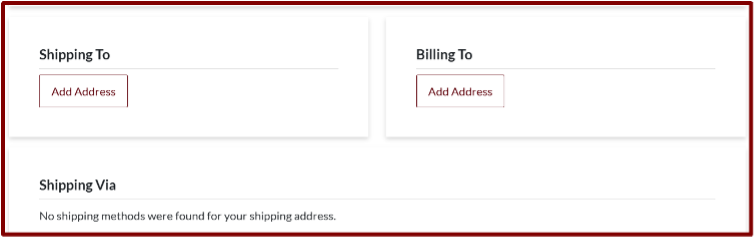
- If paying by Credit Card, the billing address must match the address on file with the Credit Card Account.
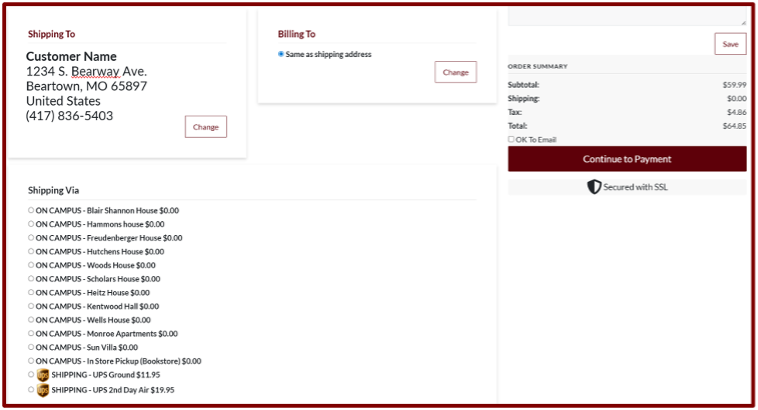
Step 5: Choose a Delivery Method
Dorm Delivery
Select your residence hall as the shipping address and we’ll bring your order to you! The hall’s front desk will notify you when it’s ready.
Ship-to-Home
Choose between UPS Ground or 2nd Day Air. Once a Ship-to-Home order is completed, local UPS Ground shipments usually arrive the following business day.
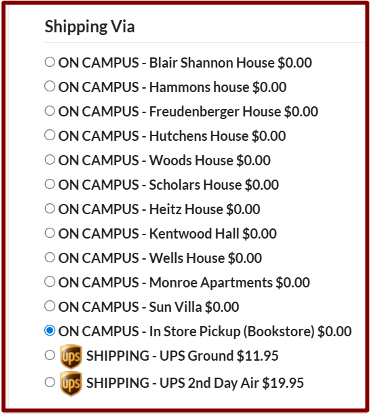
In-Store Pickup
Come to the Bookstore! Orders can be picked up at the upstairs service counter in the mezzanine.
Selecting In-Store Pickup will cause this prompt to appear. Complete the information.
- If someone else will pick the order up, put their information here.
- If you would like the “Order Ready for Pick-Up” email notification to go to your personal email, add that here.
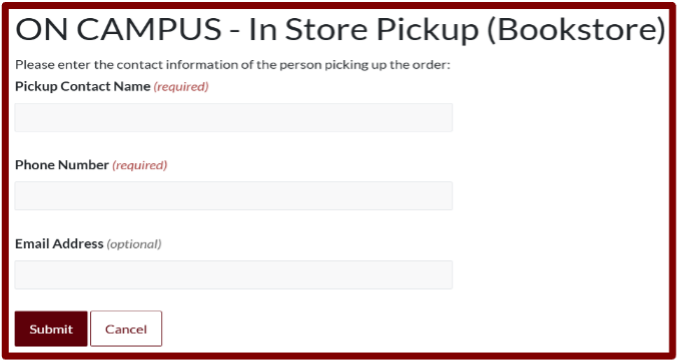
Once an In-Store order is completed, you have 10 business days after semester classes begin to collect “Ready for Pickup” In-Store order items. After these 10 business days, unclaimed items will be returned.
Step 6: Select Payment Option
Options are Student Charge, Credit Card, and Gift Card.
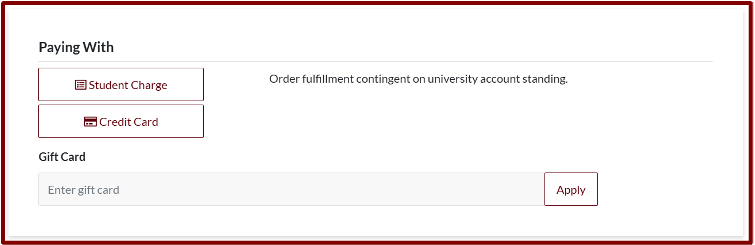
For Student Charge
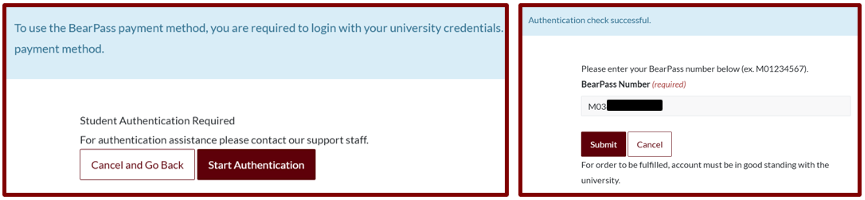
Select Student Charge and log in with your Missouri State Student Credentials. Click Start Authentication and complete account fields. Add M-Number and click Submit.
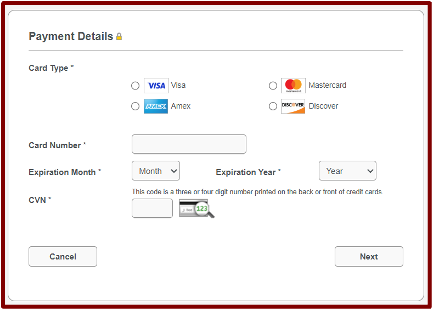
For Credit Cards
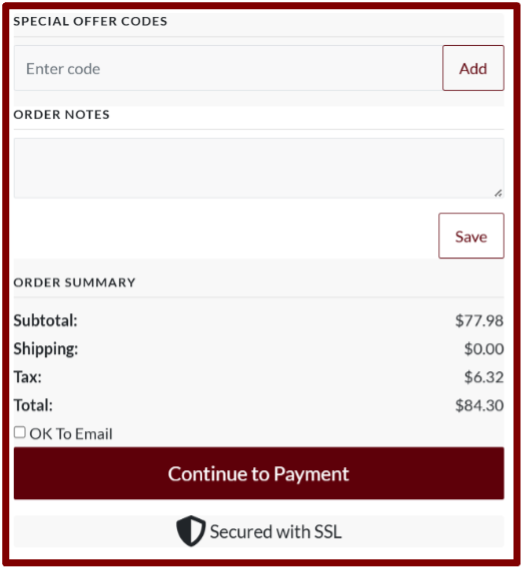
Select Credit Card then click Continue to Payment at the right of the page. You will be redirected to the Credit Card Information page. The site will fill Billing & Shipping info from the previous page. Scroll down and complete Payment Details.
- When paying by credit card, the billing address must match the address on file with the Credit Card Account.
For Gift Cards
Enter gift card number on back of card, click Apply. Then click Continue to Payment to the right of the page.
- If the gift card does not cover the full amount, add a student account or credit card payment
Step 6: Finalize Your Order
Review all entered information. If you are ready for checkout and have not already clicked Continue to Payment, you can click it now to place your order.
- After this step, if you need to make any changes to your order, you will need to contact the Bookstore at bookstore@missouristate.edu or 417-836-5403.
Step 7: Order Confirmation
You will receive an email confirming our receipt of your order.
You are not charged at this step. You will receive another email when your order is filled, and stating the order is shipping or ready for pick-up. That email designates when you have been charged.
Additional Online Order Information:
- The total cost on the confirmation email may not be the final total when an order is filled and charged to you. Substitutions may be made based on availability of New/Used condition books.
- If you need to make changes to your order after you have received your order confirmation, you will need to contact the Bookstore directly. We can make changes for you until your order is completely filled. Call 417-836-5403 or email bookstore@missouristate.edu. Please provide your M-Number and Order Number.
- You are only charged when an order is filled. Once your order is filled, you will receive an email that your order is shipping or ready for pick-up.
- Out of Stock Items - If you are ordering a book that is currently out of stock, we will process your order as soon as the item becomes available.
**We strongly encourage students who need currently out of stock titles to place an online order. If we already have the item on order, this will reserve a copy for you. If the item is not on order, it is the best method to notify us to order more stock and to notify you when a book arrives.
RETURNING ONLINE ORDERS
If you wish to return an item, get in contact with us before shipping the item back to us. Shipping fees are non-refundable. Emailed access codes are non-refundable. More information here.
(417) 836-5403
Items should be returned to:
Missouri State University Bookstore
717 S. Florence Ave.
Springfield, MO 65897